Showing posts with label java. Show all posts

Wednesday, April 7, 2010

Every thing about Jar Creation & Extraction

Question

How do I create a .JAR file?

Answer

Java Archive (JAR) files allow developers to package many classes into a single file. JAR files also use compression, so this can make applets and applications smaller.

Creating a .JAR file is easy. Simple go to the directory your classes are stored in and type :-
jar -cf myfile.jar *.class
If your application or applet uses packages, then you'll need to do things a little differently. Suppose your classes were in the package mycode.games.CoolGame - you'd change to the directory above mycode and type the following :- (Remember to use / on UNIX systems)


jar -cf myfile.jar .\mycode\games\CoolGame\*.class
Now, if you have an existing JAR file, and want to extract it, you'd type the following

jar -xf myfile.jar
Working with JAR files isn't that difficult, especially if you've used the unix 'tar' command before.  If you're planning on packaging an applet for Internet Explorer, or an application for Microsoft's jview, you might also want to consider .CAB files.


Tool for Creating JAR (Very useful when your Jar is Huuuuge !!)

 A JAR file aggregates many files into one and is used by Software developers to distribute Java classes and associated metadata through .jar files. Are you looking for a quick way to create executable JAR files? Small utility Java JarWizard makes .jar file creation process real easy.
create-java-jar-files
It has neat wizard based interface to include required files. Just select and include files you want in the final .jar archive file and click next button. In the end, it creates executable .jar file that can be easily run by any user. Download Java JarWizard


If you want to replace class files in the Jar files, the best tool to do that is Winrar, you can download it from here

Open the Jar file and just paste the desired class using Ctrl + v.

And just close winrar. It works like magic.

I didnt know this Winrar trick and i wasted nearly 3hours, where in my app server was throwing all kinds of exceptions when i manually replace class files using WinZip and CMD


TIPS: WinRAR , JAR , Extract JAR using Command prompt, Extract JAR using WinRAR, Extract JAR using Jar tool, Easy way to extract JAR, Simple way to extract JAR, Easy way to create JAR, Simple way to create JAR,

Please check with Manuals. Author is NOT responsible for any misinformation / incorrect information or typographical errors.

NOTE: If you would like to share any useful info, please mail to the authors.

Thursday, February 18, 2010

Java Best Practices - Must for Java Developers

Quote 1: Avoid creating unnecessary objects and always prefer to do Lazy Initialization

Object creation in Java is one of the most expensive operation in terms of memory utilization and performance impact. It is thus advisable to create or initialize an object only when it is required in the code.
public class Countries {

 private List countries;

 public List getCountries() {

  //initialize only when required
  if(null == countries) {
   countries = new ArrayList();
  }
  return countries;
 }
}

Quote 2: Never make an instance fields of class public

Making a class field public can cause lot of issues in a program. For instance you may have a class called MyCalender. This class contains an array of String weekdays. You may have assume that this array will always contain 7 names of weekdays. But as this array is public, it may be accessed by anyone. Someone by mistake also may change the value and insert a bug!
public class MyCalender {

 public String[] weekdays =
  {"Sun", "Mon", "Tue", "Thu", "Fri", "Sat", "Sun"};

 //some code 

}
Best approach as many of you already know is to always make the field private and add a getter method to access the elements.
private String[] weekdays =
  {"Sun", "Mon", "Tue", "Thu", "Fri", "Sat", "Sun"};

 public String[] getWeekdays() {
  return weekdays;
 }
But writing getter method does not exactly solve our problem. The array is still accessible. Best way to make it unmodifiable is to return a clone of array instead of array itself. Thus the getter method will be changed to.
public String[] getWeekdays() {
  return weekdays.clone();
 }

Quote 3: Always try to minimize Mutability of a class

Making a class immutable is to make it unmodifiable. The information the class preserve will stay as it is through out the lifetime of the class. Immutable classes are simple, they are easy to manage. They are thread safe. They makes great building blocks for other objects.
However creating immutable objects can hit performance of an app. So always choose wisely if you want your class to be immutable or not. Always try to make a small class with less fields immutable.
To make a class immutable you can define its all constructors private and then create a public static method
to initialize and object and return it.
public class Employee {

 private String firstName;
 private String lastName;

 //private default constructor
 private Employee(String firstName, String lastName) {
  this.firstName = firstName;
  this.lastName = lastName;
 }

 public static Employee valueOf (String firstName, String lastName) {
  return new Employee(firstName, lastName);
 }
}

Quote 4: Try to prefer Interfaces instead of Abstract classes

First you can not inherit multiple classes in Java but you can definitely implements multiple interfaces. Its very easy to change the implementation of an existing class and add implementation of one more interface rather then changing full hierarchy of class.
Again if you are 100% sure what methods an interface will have, then only start coding that interface. As it is very difficult to add a new method in an existing interface without breaking the code that has already implemented it. On contrary a new method can be easily added in Abstract class without breaking existing functionality.

Quote 5: Always try to limit the scope of Local variable

Local variables are great. But sometimes we may insert some bugs due to copy paste of old code. Minimizing the scope of a local variable makes code more readable, less error prone and also improves the maintainability of the code.
Thus, declare a variable only when needed just before its use.
Always initialize a local variable upon its declaration. If not possible at least make the local instance assignednull value.

Quote 6: Try to use standard library instead of writing your own from scratch

Writing code is fun. But “do not reinvent the wheel”. It is very advisable to use an existing standard library which is already tested, debugged and used by others. This not only improves the efficiency of programmer but also reduces chances of adding new bugs in your code. Also using a standard library makes code readable and maintainable.
For instance Google has just released a new library Google Collections that can be used if you want to add advance collection functionality in your code.

Quote 7: Wherever possible try to use Primitive types instead of Wrapper classes

Wrapper classes are great. But at same time they are slow. Primitive types are just values, whereas Wrapper classes are stores information about complete class.
Sometimes a programmer may add bug in the code by using wrapper due to oversight. For example, in below example:
int x = 10;
int y = 10;

Integer x1 = new Integer(10);
Integer y1 = new Integer(10);

System.out.println(x == y);
System.out.println(x1 == y1);
The first sop will print true whereas the second one will print false. The problem is when comparing two wrapper class objects we cant use == operator. It will compare the reference of object and not its actual value.
Also if you are using a wrapper class object then never forget to initialize it to a default value. As by default all wrapper class objects are initialized to null.
Boolean flag;

if(flag == true) {
 System.out.println("Flag is set");
} else {
 System.out.println("Flag is not set");
}
The above code will give a NullPointerException as it tries to box the values before comparing with true and as its null.

Quote 8: Use Strings with utmost care.

Always carefully use Strings in your code. A simple concatenation of strings can reduce performance of program. For example if we concatenate strings using + operator in a for loop then everytime + is used, it creates a new String object. This will affect both memory usage and performance time.
Also whenever you want to instantiate a String object, never use its constructor but always instantiate it directly. For example:
//slow instantiation
String slow = new String("Yet another string object");

//fast instantiation
String fast = "Yet another string object";

Quote 9: Always return empty Collections and Arrays instead of null

Whenever your method is returning a collection element or an array, always make sure you return emptyarray/collection and not null. This will save a lot of if else testing for null elements. For instance in below example we have a getter method that returns employee name. If the name is null it simply return blank string “”.
public String getEmployeeName() {
 return (null==employeeName ? "": employeeName);
}

Quote 10: Defensive copies are savior

Defensive copies are the clone objects created to avoid mutation of an object. For example in below code we have defined a Student class which has a private field birth date that is initialized when the object is constructed.
public class Student {
 private Date birthDate;

 public Student(birthDate) {
  this.birthDate = birthDate;
 }

 public Date getBirthDate() {
  return this.birthDate;
 }
}
Now we may have some other code that uses the Student object.
public static void main(String []arg) {

 Date birthDate = new Date();
 Student student = new Student(birthDate);

 birthDate.setYear(2019);

 System.out.println(student.getBirthDate());
}
In above code we just created a Student object with some default birthdate. But then we changed the value of year of the birthdate. Thus when we print the birth date, its year was changed to 2019!
To avoid such cases, we can use Defensive copies mechanism. Change the constructor of Student class to following.
public Student(birthDate) {
 this.birthDate = new Date(birthDate);
}
This ensure we have another copy of birthdate that we use in Student class.

Quote 11: Never let exception come out of finally block

Finally blocks should never have code that throws exception. Always make sure finally clause does not throw exception. If you have some code in finally block that does throw exception, then log the exception properly and never let it come out :)

Quote 12: Never throw “Exception”

Never throw java.lang.Exception directly. It defeats the purpose of using checked Exceptions. Also there is no useful information getting conveyed in caller method.

Quote #13: Avoid floating point numbers

It is a bad idea to use floating point to try to represent exact quantities like monetary amounts. Using floating point for dollars-and-cents calculations is a recipe for disaster. Floating point numbers are best reserved for values such as measurements, whose values are fundamentally inexact to begin with. For calculations of monetary amounts it is better to use BigDecimal.

From Viral

Tuesday, October 27, 2009

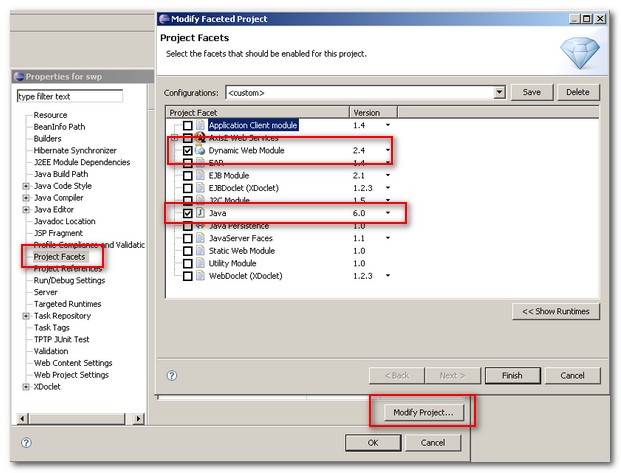
How to convert Java Project to Web Project in Eclipse Ganymede, Europa


Sometime we just need to convert our Java Project to Web Project in Eclipse IDE.

Here is some of the reasons you may need to convert Java Project to Web Project

1) Create / import a wrong project type
2) Initial java project migrate to java web project
3) Maven create a Java Project (eclipse:eclipse), but we need a web project feature.
4) Others…?
No mater what reasons we need to convert java project to web project. Eclipse does not provide a feature to convert it automatically. We have to do it manually.

Here is the steps to convert Java Project to Web Project in Eclipse

1) Create a empty dynamic web project and click on the .project file
2) Copy “web project” facet buildCommand and paste within “java project” .project buildSpec tag
<buildCommand>
  <name>org.eclipse.wst.common.project.facet.core.builder</name>
  <arguments>
  </arguments>
 </buildCommand>
3) Copy “web project” facet nature and paste within “java project” .project natures tag
<nature>org.eclipse.wst.common.project.facet.core.nature</nature>
P.S Be careful of the .project xml tag, make sure you paste into a correct location.
4) Save it.
5) Right click on Java Project, click properties.
6) Select Project Facets and click modify project button.
7) Click Dynamic Web Module and Java check box.


Please check with Manuals. Author is NOT responsible for any misinformation / incorrect information or typographical errors.


NOTE: If you would like to share any useful info, please mail to the authors.

Monday, October 26, 2009

Using Java 5.0 Generics With Wildcards, Extends and more

Using Generics With Wildcards and Extends


By John Zukowski


Java 2 Platform, Standard Edition 5.0 (J2SE 5.0) introduced generics to the Java programming language and
platform. In the simplest case and typical usage, generics allow for the identification of what you want
 to store in a collection. So instead of saying that your program has a List ofObjects, you can now
specify that you have a List of String objects or some other class type. Then, if you accidentally
try to add something to the List that is of the wrong type, the compiler notifies you of the error and it
can be fixed at compile time, rather than having to wait until you run the program and the program
reaches the point in code where the fetch operation produces a runtime casting exception.

This brings up a second benefit of generics. Iterators now become typesafe. The next()
 method of the Iterator interface returns the typesafe version of the next element of the collection.

 Most people don't fully understand the use of the extends keyword when using generics
A typical example shown to explain the use of extends has to do with drawing shapes. Instead, this
 tech tip will use an example that uses Swing components so that you do not have to create extra
new classes. In a very limited case, the class hierarchy for Swing button components is shown here,
with Object as the real root:


Component
|- Container
   |- JComponent
      |- AbstractButton
         |- JButton
         |- JMenuItem
            |- JCheckBoxMenuItem
            |- JMenu
            |- JRadioButtonMenuItem
         |- JToggleButton
            |- JCheckBox
            |- JRadioButton

One thing that all AbstractButton subclasses share in common is a getText() method. So in the spirit
of generics, you can define a method that takes a List of AbstractButton items and return a List
of the String labels of those buttons. Here's the first version of such a method:


public static List<String> getLabels(List<AbstractButton> list) {
    List<String> labelList = new ArrayList<String>(list.size());
    for (AbstractButton button: list) {
      labelList.add(button.getText());
    }
    return labelList;
  }


And here is how you might use the method. First, define a List of AbstractButton types, fill it up,
and call the method:
"Hola, Mundo" is the Spanish translation of "Hello, World," according to Google. The results of


List<AbstractButton> buttonList =
      new ArrayList<AbstractButton>();
  buttonList.add(new JButton("Hello"));
  buttonList.add(new JCheckBox("World"));
  buttonList.add(new JRadioButton("Hola"));
  buttonList.add(new JMenuItem("Mundo"));


  List labels = getLabels(buttonList);
  System.out.println(labels);


 the println() call is as follows:


[Hello, World, Hola, Mundo]

With a List of AbstractButtons, everything functions fine, but this breaks down when the List
is of something else, specifically a subclass. One would logically think that with a List of JButton
 items, everything would work fine, because JButton is a subclass of AbstractButton. Shouldn't you
 be able to call getLabels(List<AbstractButton>) with a List of a subclass of AbstractButton?


List<JButton> buttonList = ...
  // ... Fill list ...
  List<String> labels = getLabels(buttonList);


Well, that isn't the case. Because this is a compile-time check, and because the definition of getLabels()
 is defined to accept only anAbstractButton List, you cannot pass anything else to it. The
compilation-time error message follows:


GetList.java:13: getLabels(java.util.List<javax.swing.AbstractButton>)
  in GetList cannot be applied to (java.util.List<javax.swing.JButton>)


    List<String> labels = getLabels(buttonList);
                          ^
1 error


And this is where the extends keyword comes in handy. Instead of defining the getLabels() method to
accept only an AbstractButton list, define it to accept any List of AbstractButton subclasses:


public static List<String> getLabels(
      List<? extends AbstractButton> list) {


The wildcard ? here says that the method doesn't care what the exact class type is, as long as it is
a subclass of AbstractButton. Here's a complete example that puts all the pieces together:


import java.util.*;
import javax.swing.*;


public class GetList {
  public static void main(String args[]) {
    List<JButton> buttonList =
      new ArrayList<JButton>();
    buttonList.add(new JButton("Hello"));
    buttonList.add(new JButton("World"));
    buttonList.add(new JButton("Hola"));
    buttonList.add(new JButton("Mundo"));


    List labels = getLabels(buttonList);
    System.out.println(labels);


  }


  public static List<String> getLabels(
        List<? extends AbstractButton> list) {
    List<String> labelList = new ArrayList<String>(list.size());
    for (AbstractButton button: list) {
      labelList.add(button.getText());
    }
    return labelList;
  }
}


Now, when you are defining your own classes and methods with generics and are thinking of accepting
 an abstract class as the generic argument, or any superclass, remember to use wildcards so that the
same method works best with subclasses too.


For more information on generics, 


1. see two earlier tutorials by Gilad Bracha: a 2004 tutorial (PDF) and the generics
 lesson in the online Java Tutorial.


2. Who wants to really understand wildcards to read this paper by Bracha and Torgersen:
http://bracha.org/wildcards.pdf


4. The best on-line reference for programming with Java Generics: http://www.angelikalanger.com/GenericsFAQ/JavaGenericsFAQ.html


Please check with Manuals. Author is NOT responsible for any misinformation / incorrect information or typographical errors.


NOTE: If you would like to share any useful info, please mail to the authors.

Wednesday, September 23, 2009

Java Performance Optimization Tips & Interview Questions

What are common optimizing practices for a class?


  • Use primitive data types instead of objects as instance variables
  • Keep constructors simple and inheritance hierarchies shallow
  • Avoid initializing instance variable more than once
  • Eliminate unnecessary type casts
  • Enumerators are faster than Iterators due to the specific implementation
  • Ints are the fastest datatypeUse static variables for fields that only need to be assigned once
  • Final classes can be faster
  • Use interfaces, so that the actual underlying data structure can be actually changed without impacting the client program
  • Null out references when they are no longer needed so that gc can collect them when it is running.
  • Avoid character processing using methods like charAt(), setCharAt() methods
  • Use local variables in preference to class variables
  • Compound operators such as n += 4; are faster than n = n + 4; because fewer bytecodes are generated.
  • Shifting by powers of two is faster than multiplying.
  • Multiplication is faster than exponentiation.
  • int increments are faster than byte or short increments.
  • Floating point increments are much slower than any integral increment.
  • It can help to copy slower-access vars to fast local vars if you are going to operate on them repeatedly, as in a loop.
  • For some applications that access the date a lot, it can help to set the local timezone to be GMT, so that no conversion has to take place.
  • Minimize creation of short-lived objects.
  • Avoid excessive writing to the Java console
  • Minimize the number of JNI calls
  • Avoid unnecessary instanceof operation
  • Avoid using long divides.
  • Persistency adds overheads that make persistent objects slower.
  • Use pipelining and parallelism. Designing applications to support lots of parallel processes working on easily distinguished subsets of the work makes the application faster. If there are multiple steps to processing, try to design your application so that subsequent steps can start working on the portion of data that any prior process has finished, instead of having to wait until the prior process is complete.
  • Use bitshift instead of multiplying or dividing by powers of 2.
  • Scope of variables can impact performance.
  • Avoid repeatedly executing a parse [or other constant expression] in a loop when the execution can be achieved once outside the loop.
  • Use exception only where you need them


How do you optimize methods in a class?

  • Avoid creating temporary objects within frequently called methods
  • Define methods that accept reusable objects to be filled in with data, rather than methods that return objects holding that data.
  • Use methods that alter objects without making copies
  • Eliminate repeatedly called methods where alternatives are possible [For example, if you are processing a vector in a loop, get the size of the vector in the beginning in a length local variable rather than calling size() method on the vector in the condition part of the for loop]
  • Use private and static methods and final classes to encourage inlining by the compiler
  • Inline methods manually where it is appropriate
  • Keep methods short and simple to make them automatic inlining candidates
  • Access to private member by the inner classes to the enclosing class goes by a method call even if it is not intended to.
  • Keep synchronized methods out of loops if you possibly can.


How do you optimize loops and conditional statements?

  • Reduce the number of temporary objects being used,especially in loops.
  • Use short-circuit Boolean operators instead of normal Boolean operators
  • Eliminate unnecessary repeated method calls from loops
  • Move loop invariants outside the loop.
  • Perform the loop backwards (this actually performs slightly faster than forward loops do). [Actually it is converting the test to compare against 0 that makes the difference].
  • It can help to copy slower-access vars to fast local vars if you are going to operate on them repeatedly, as in a loop.
  • Use exception terminated infinite loops for long loops.
  • Whatever can be calculated outside of a loop should be calculated outside of the loop.
  • For multidimensional arrays store a reference for the currently accessed row in a variable.
  • Cache the size of the collection in a local variable to use in a loop instead of repeatedly calling collection.size().


How do you optimize Strings?

  • Use StringBuffer instead of String concat ‘+’ operator
  • Formatting numbers using java.text.DecimalFormat is always slower than Double.toString(double) method, because internally java.text.DecimalFormat() calls
  • Double.toString(double) then parses and converts the results.
  • Convert String to char[] arrays to process characters rather than accessing one at a time using String.charAt() method
  • Creating Double from string is slow
  • Intern() Strings to enable (==) comparisions
  • Use char arrays for all character processing in loops, rather than using String or StringBuffer classes
  • Set the initial string buffer size to maximum if it known.
  • StringTokenizer is very inefficient, and can be optimized by storing the string and delimiter in a character array instead of in String
  • DON’T create static strings via new().
  • Where the compiler cannot resolve concatenated strings at compile time, the code should be converted to StringBuffer appends, and the StringBuffer should be appropriately sized rather than using the default size.
  • The compiler concatenates strings where they are fully resolvable, so don t move these concatenations to runtime with StringBuffer.


How do you optimize arrays, vectors and collections?

  • Create copies of simple array by initializing them through loops or by using System.arraycopy(), create copies of complex arrays by cloning them
  • Iterator.hasNext() and Enumerator.hasMoreElements() need not be repeatedly called when the size of the collection is known. Use collection.size() and a loop counter instead.
  • ArrayList is faster than Vector
  • Go for a non-synchronized version of collection unless used in a threaded application
  • LinkedList is faster than ArrayList for inserting elements to the front of the array, but slower at indexed lookup
  • Accessing arrays is much faster than accessing vectors, String, and StringBuffer
  • Vector is convenient to use, but inefficient. Ensure that elementAt() is not used inside a loop.
  • Re-use Hashtables by using Hashtable.clear().
  • Removing elements from a Vector will necessitate copying within the Vector if the element is removed from anywhere other than the end of the collection.
  • Presizing collections to the expected size is more efficient than using the default size and letting the collection grow.
  • For multidimensional arrays store a reference for the currently accessed row in a variable.
  • When adding multiple items to a collection, add them all in one call if possible.


How do you optimize threads?

  • Avoid synchronization where possible
  • Code a multi-thread for multi-processor machine.
  • Synchronizing on method rather than code blocks is slightly faster
  • Polling is only acceptable when waiting for outside events and should be performed in a "side" thread. Use wait/notify instead.
  • Prioritize threads. Use notify instead of notifyAll. Use synchronization sparingly.
  • Keep synchronized methods out of loops if you possibly can.
  • Maximize thread lifetimes and minimize thread creation/destruction cycles.
  • Use Thread pools where these improve performance.
  • Use Thread.sleep() instead of a for loop for measured delays.
  • Use a separate timer thread to timeout socket operations
  • Use more server threads if multiple connections have high latency.


How do you optimize IO?
  • Use Buffered IO classes
  • File information such as file length requires a system call and can be slow… Don’t use it often. Similarly, System.currentTimeMillis() uses a native call to get current time. Make sure your production code does not have this statement.
  • Many java.io.File methods are system calls which can be slow
  • Use BufferedIO streams to access URLConnection sInput/Output streams.
  • Use the transient keyword to define fields to avoid having those fields serialized. Examine serialized objects to determine which fields do not need to be serialized for the application to work.
  • Increase server listen queues for high load or high latency servers.


How do you optimize exceptions?

  • Be specific while handling the exception in your catch block.
  • Be specific while throwing exception in your throws clause.
  • Do not use Exception Handling to control programming flow.
  • Very little overhead is imposed by using exception handling mechanism unless an exception occurs or thrown a new exception object explicitly.
  • Always use the finally block to release the resources to prevent resource leaks.
  • Handle exceptions locally wherever possible.
  • Do not use Exception handling in loops.


How will you optimize performance in JDBC?

  • Use batch transactions.
  • Choose right isolation level as per your requirement. TRANSACTION_READ_UNCOMMITED gives best performance for concurrent transaction based applications. TRANSACTION_NONE gives best performance for non-concurrent transaction based applications.
  • Use PreparedStatement when you execute the same statement more than once.
  • Use CallableStatement when you want result from multiple and complex statements for a single request.
  • Use batch update facility available in Statements.
  • Use batch retrieval facility available in Statements or ResultSet.
  • Set up proper direction for processing rows.
  • Use proper getXXX() methods.
  • Close ResultSet, Statement and Connection whenever you finish your work with them.
  • Write precise SQL queries.
  • Cache read-only and read-mostly tables data.
  • Fetch small amount of data iteratively rather than whole data at once when retrieving large amount of data like searching database etc.


How do you optimize servlets?

  • Use init() method to cache static data
  • Use StringBuffer rather than using + operator when you concatenate multiple strings
  • Use print() method rather than println() method
  • Use ServletOutputStream rather than PrintWriter to send binary data
  • Initialize the PrintWriter with proper size
  • Flush the data partly
  • Minimize code in the synchronized block
  • Set the content length
  • Release resources in destroy() method.
  • Implement getLastModified() method to use browser cache and server cache
  • Use application server caching facility
  • Use Mixed session mechanisms such as HttpSession with hidden fields
  • Remove HttpSession objects explicitly in your program whenever you finish the task
  • Reduce session time out value as much as possible
  • Use 'transient' variables to reduce serialization overhead if your HttpSession tracking mechanism uses serialization process.
  • Disable servlet auto reloading feature.
  • Use thread pool for your servlet engine and define the size as per application requirement.


How do you optimize a JSP page?


  • Use jspInit() method to cache static data
  • Use StringBuffer rather than using + operator when you concatenate multiple strings
  • Use print() method rather than println() method
  • Use ServletOutputStream instead of JSPWriter to send binary data
  • Initialize the 'out' object (implicit object) with proper size in the page directive.
  • Flush the data partly
  • Minimize code in the synchronized block
  • Set the content length
  • Release resources in jspDestroy() method.
  • Give 'false' value to the session in the page directive to avoid session object creation.
  • Use include directive instead of include action when you want to include the child page content in the translation phase.
  • Avoid giving unnecessary scope in the 'useBean' action.
  • Do not use custom tags if you do not have reusability.
  • Use application server caching facility
  • Use Mixed session mechanisms such as 'session' with hidden fields
  • Use 'session' and 'application' as cache.
  • Use caching tags provided by different organizations like openSymphony.com
  • Remove 'session' objects explicitly in your program whenever you finish the taskReduce session time out value as much as possible
  • Use 'transient' variables to reduce serialization overhead if your session tracking mechanism uses serialization process.
  • Disable JSP auto reloading feature.
  • Use thread pool for your JSP engine and define the size of thread pool as per application requirement.


What are common optimizing practices for EJB?

  • Use Local interfaces that are available in EJB2.0 if you deploy both EJB Client and EJB in the same EJB Server.
  • Use Vendor specific pass-by-reference implementation to make EJB1.1 remote EJBs as Local EJBs if you deploy both EJB Client and EJB in the same EJB Server.
  • Wrap entity beans with session beans to reduce network calls and to promote declarative transactions. Optionally, make entity beans as local beans where appropriate.
  • Make coarse grained session and entity beans to reduce network calls.
  • Control serialization by modifying unnecessary data variables with 'transient' key word to avoid unnecessary data transfer over network.Cache EJBHome references to avoid JNDI lookup overhead.
  • Avoid transaction overhead for non-transactional methods of session beans by declaring 'NotSupported' or 'Never' transaction attributes that avoid further propagation of transactions.
  • Set proper transaction age(time-out) to avoid large transaction.
  • Use clustering for scalability.
  • Tune thread count for EJB Server to increase EJB Server capacity.
  • Choose servlet's HttpSession object rather than Stateful session bean to maintain client state if you don't require component architecture and services of Stateful session bean.
  • Choose best EJB Server by testing with ECperf tool kit.
  • Choose normal java object over EJB if you don't want built-in services such as RMI/IIOP, transactions, security, persistence, resource pooling, thread safe, client state etc..


How do you optimize stateless session beans?

  • Tune the Stateless session beans pool size to avoid overhead of creation and destruction of beans.
  • Use setSessionContext() or ejbCreate() method to cache bean specific resources.
  • Release acquired resources in ejbRemove() method


How do you optimize stateful session beans?

  • Tune Stateful session beans cache size to avoid overhead of activation and passivation process.
  • Set optimal Stateful session bean age(time-out) to avoid resource congestion.
  • Use 'transient' key word for unnecessary variables of Stateful session bean to avoid serialization overhead.
  • Remove Stateful session beans explicitly from client using remove() method.


How do you optimize entity beans?

  • Tune the entity beans pool size to avoid overhead of creation and destruction of beans.
  • Tune the entity beans cache size to avoid overhead of activation, passivation and database calls.
  • Use setEntityContext() method to cache bean specific resources.
  • Release acquired resources in unSetEntityContext() method
  • Use Lazy loading to avoid unnecessary pre-loading of child data.
  • Choose optimal transaction isolation level to avoid blocking of other transactional clients.
  • Use proper locking strategy.
  • Make read-only entity beans for read only operations.
  • Use dirty flag to avoid unchanged buffer data updation.
  • Commit the data after the transaction completes to reduce database calls in between transaction.
  • Do bulk updates to reduce database calls.
  • Use CMP rather than BMP to utilize built-in performance optimization facilities of CMP.
  • Use ejbHome() methods for global operations.
  • Tune connection pool size to reduce overhead of creation and destruction of database connections.
  • Use JDBC tuning techniques in BMP.
  • Use direct JDBC rather than using entity beans when dealing with huge data such as searching a large database.
  • Use business logic that is specific to entity bean data.


How do you optimize message driven beans?

  • Tune the Message driven beans pool size to promote concurrent processing of messages.
  • Use setMesssageDrivenContext() or ejbCreate() method to cache bean specific resources.
  • Release acquired resources in ejbRemove() method.
  • Use JMS tuning techniques in Message driven beans.


How do you optimize Java Message Service (JMS)?


  • Start producer connection after you start consumer.
  • Use concurrent processing of messages.
  • Close the Connection when finished.
  • Choose either DUPS_OK_ACKNOWLEDGE or AUTO_ACKNOWLEDGE rather than CLIENT_ACKNOWLEDGE.
  • Control transactions by using separate transactional session for transactional messages and non-transactional session for non-transactional messages.
  • Close session object when finished.
  • Make Destination with less capacity and send messages accordingly.
  • Set high Redelivery delay time to reduce network traffic.
  • Set less Redelivery limit for reducing number of message hits.
  • Choose non-durable messages wherever appropriate to avoid persistence overhead.
  • Set optimal message age (TimeToLive value).
  • Receive messages asynchronously.
  • Close Producer/Consumer when finished.
  • Choose message type carefully to avoid unnecessary memory overhead.
  • Use 'transient' key word for variables of ObjectMessage which need not be transferred.


-----
Please check with Manuals. Author is NOT responsible for any misinformation / incorrect information or typographical errors.


NOTE: If you would like to share any useful info, please mail to the authors.

Sunday, September 13, 2009

Exceptions Interview Questions

Q1) What is an Exception?

Ans) The exception is said to be thrown whenever an exceptional event occurs in java which signals that something is not correct with the code written and may give unexpected result. An exceptional event is a occurrence of condition which alters the normal program flow. Exceptional handler is the code that does something about the exception.

Q2) Exceptions are defined in which java package?

Ans)All the exceptions are subclasses of java.lang.Exception

Q3) How are the exceptions handled in java?

Ans)When an exception occurs the execution of the program is transferred to an appropriate exception handler.The try-catch-finally block is used to handle the exception.
The code in which the exception may occur is enclosed in a try block, also called as a guarded region.
The catch clause matches a specific exception to a block of code which handles that exception.
And the clean up code which needs to be executed no matter the exception occurs or not is put inside the finally block

Q4) Explain the exception hierarchy in java.

Ans) The hierarchy is as follows:


Throwable is a parent class off all Exception classes. They are two types of Exceptions: Checked exceptions and UncheckedExceptions. Both type of exceptions extends Exception class.

Q5) What is Runtime Exception or unchecked exception?

Ans) Runtime exceptions represent problems that are the result of a programming problem. Such problems include arithmetic exceptions, such as dividing by zero; pointer exceptions, such as trying to access an object through a null reference; and indexing exceptions, such as attempting to access an array element through an index that is too large or too small. Runtime exceptions need not be explicitly caught in try catch block as it can occur anywhere in a program, and in a typical one they can be very numerous. Having to add runtime exceptions in every method declaration would reduce a program's clarity. Thus, the compiler does not require that you catch or specify runtime exceptions (although you can). The solution to rectify is to correct the programming logic where the exception has occurred or provide a check.

Q6) What is checked exception?

Ans) Checked exception are the exceptions which forces the programmer to catch them explicitly in try-catch block. It is a subClass of Exception. Example: IOException.

Q7) What is difference between Error and Exception?

Ans) An error is an irrecoverable condition occurring at runtime. Such as OutOfMemory error. These JVM errors and you can not repair them at runtime.Though error can be caught in catch block but the execution of application will come to a halt and is not recoverable.

While exceptions are conditions that occur because of bad input etc. e.g. FileNotFoundException will be thrown if the specified file does not exist. Or a NullPointerException will take place if you try using a null reference. In most of the cases it is possible to recover from an exception (probably by giving user a feedback for entering proper values etc.)

Q8) What is difference between ClassNotFoundException and NoClassDefFoundError?

Ans) A ClassNotFoundException is thrown when the reported class is not found by the ClassLoader in the CLASSPATH. It could also mean that the class in question is trying to be loaded from another class which was loaded in a parent classloader and hence the class from the child classloader is not visible.

Consider if NoClassDefFoundError occurs which is something like

java.lang.NoClassDefFoundError

src/com/TestClass

does not mean that the TestClass class is not in the CLASSPATH. It means that the class TestClass was found by the ClassLoader however when trying to load the class, it ran into an error reading the class definition. This typically happens when the class in question has static blocks or members which use a Class that's not found by the ClassLoader. So to find the culprit, view the source of the class in question (TestClass in this case) and look for code using static blocks or static members.

Q9) What is throw keyword?


Ans) Throw keyword is used to throw the exception manually. It is mainly used when the program fails to satisfy the given condition and it wants to warn the application.The exception thrown should be subclass of Throwable.
public void parent(){
try{
child();
}catch(MyCustomException e){ }
}


public void child{
String iAmMandatory=null;
if(iAmMandatory == null){
throw (new MyCustomException("Throwing exception using throw keyword");
}
}
Q10) What is use of throws keyword?


Ans) If the function is not capable of handling the exception then it can ask the calling method to handle it by simply putting the throws clause at the function declaration.
public void parent(){
try{
child();
}catch(MyCustomException e){ }
}


public void child throws MyCustomException{
//put some logic so that the exception occurs.
}
Q11) What are the possible combination to write try, catch finally block?

Ans)

1) try{
//lines of code that may throw an exception

}catch(Exception e){

//lines of code to handle the exception thrown in try block

}finally{

//the clean code which is executed always no matter the exception occurs or not.

}


2 try{

}finally{}

3 try{

}catch(Exception e){

//lines of code to handle the exception thrown in try block

}


The catch blocks must always follow the try block. If there are more than one catch blocks they all must follow each other without any block in between. The finally block must follow the catch block if one is present or if the catch block is absent the finally block must follow the try block.

Q12) How to create custom Exception?
Ans) To create you own exception extend the Exception class or any of its subclasses.

e.g.

1 class New1Exception extends Exception { } // this will create Checked Exception

2 class NewException extends IOExcpetion { } // this will create Checked exception

3 class NewException extends NullPonterExcpetion { } // this will create UnChecked exception

Q13) When to make a custom checked Exception or custom unchecked Exception?

Ans) If an application can reasonably be expected to recover from an exception, make it a checked exception. If an application cannot do anything to recover from the exception, make it an unchecked exception.

Q14)What is StackOverflowError?

Ans) The StackOverFlowError is an Error Object thorwn by the Runtime System when it Encounters that your application/code has ran out of the memory. It may occur in case of recursive methods or a large amount of data is fetched from the server and stored in some object. This error is generated by JVM.

e.g. void swap(){

swap();

}

Q15) Why did the designers decide to force a method to specify all uncaught checked exceptions that can be thrown within its scope?

Ans) Any Exception that can be thrown by a method is part of the method's public programming interface. Those who call a method must know about the exceptions that a method can throw so that they can decide what to do about them. These exceptions are as much a part of that method's programming interface as its parameters and return value.

Q16) Once the control switches to the catch block does it return back to the try block to execute the balance code?

Ans) No. Once the control jumps to the catch block it never returns to the try block but it goes to finally block(if present).

Q17) Where is the clean up code like release of resources is put in try-catch-finally block and why?

Ans) The code is put in a finally block because irrespective of try or catch block execution the control will flow to finally block. Typically finally block contains release of connections, closing of result set etc.

Q18) Is it valid to have a try block without catch or finally?
Ans) NO. This will result in a compilation error. The try block must be followed by a catch or a finally block. It is legal to omit the either catch or the finally block but not both.

e.g. The following code is illegal.

try{
int i =0;
}
int a = 2;
System.out.println(“a = “+a);

Q19) Is it valid to place some code in between try the catch/finally block that follows it?
Ans) No. There should not be any line of code present between the try and the catch/finally block.

e.g. The following code is wrong.

try{}
String str = “ABC”;
System.out.println(“str = “+str);
catch(Exception e){}

Q20) What happens if the exception is never caught and throws down the method stack?

Ans) If the exception is not caught by any of the method in the method’s stack till you get to the main() method, the main method throws that exception and the JVM halts its execution.

Q21) How do you get the descriptive information about the Exception occurred during the program execution?

Ans) All the exceptions inherit a method printStackTrace() from the Throwable class. This method prints the stack trace from where the exception occurred. It prints the most recently entered method first and continues down, printing the name of each method as it works its way down the call stack from the top.

Q22) Can you catch more than one exceptions in a single catch block?

Ans)Yes. If the exception class specified in the catch clause has subclasses, any exception object that is a subclass of the specified Exception class will be caught by that single catch block.

E.g..

try {

// Some code here that can throw an IOException

}

catch (IOException e) {

e.printStackTrace();

}

The catch block above will catch IOException and all its subclasses e.g. FileNotFoundException etc.

Q23)Why is not considered as a good practice to write a single catchall handler to catch all the exceptions?

Ans) You can write a single catch block to handle all the exceptions thrown during the program execution as follows :

try {

// code that can throw exception of any possible type

}catch (Exception e) {

e.printStackTrace();

}

If you use the Superclass Exception in the catch block then you will not get the valuable information about each of the exception thrown during the execution, though you can find out the class of the exception occurred. Also it will reduce the readability of the code as the programmer will not understand what is the exact reason for putting the try-catch block.

Q24) What is exception matching?
Ans) Exception matching is the process by which the the jvm finds out the matching catch block for the exception thrown from the list of catch blocks. When an exception is thrown, Java will try to find by looking at the available catch clauses in the top down manner. If it doesn't find one, it will search for a handler for a supertype of the exception. If it does not find a catch clause that matches a supertype for the exception, then the exception is propagated down the call stack. This process is called exception matching.

Q25) What happens if the handlers for the most specific exceptions is placed above the more general exceptions handler?
Ans) Compilation fails. The catch block for handling the most specific exceptions must always be placed above the catch block written to handle the more general exceptions.

e.g. The code below will not compile.

1 try {

// code that can throw IOException or its subtypes

} catch (IOException e) {

// handles IOExceptions and its subtypes

} catch (FileNotFoundException ex) {

// handle FileNotFoundException only

}

The code below will compile successfully :-

try {
// code that can throw IOException or its subtypes
} catch (FileNotFoundException ex) {
// handles IOExceptions and its subtypes
} catch (IOException e){
// handle FileNotFoundException only
}
Q26) Does the order of the catch blocks matter if the Exceptions caught by them are not subtype or supertype of each other
Ans) No. If the exceptions are siblings in the Exception class’s hierarchy i.e. If one Exception class is not a subtype or supertype of the other, then the order in which their handlers(catch clauses) are placed does not matter.

Q27) What happens if a method does not throw an checked Exception directly but calls a method that does? What does 'Ducking' the exception mean?

Ans) If a method does not throw an checked Exception directly but calls a method that throws an exception then the calling method must handle the throw exception or declare the exception in its throws clause. If the calling method does not handle and declares the exception, the exceptions is passed to the next method in the method stack. This is called as ducking the exception down the method stack.

e.g. The code below will not compile as the getCar() method has not declared the CarNotFoundException which is thrown by the getColor () method.

void getCar() {

getColor();

}

void getColor () {

throw new CarNotFoundException();

}

Fix for the above code is

void getCar() throws CarNotFoundException {

getColor();

}

void getColor () {

throw new CarNotFoundException();

}

Q28) Is an empty catch block legal?

Ans) Yes you can leave the catch block without writing any actual code to handle the exception caught.

e.g. The code below is legal but not appropriate, as in this case you will nt get any information about the exception thrown.

try{

//code that may throw the FileNotFoundException

}catch(FileNotFound eFnf){

//no code to handle the FileNotFound exception

}


Q29)Can a catch block throw the exception caught by itself?

Ans) Yes. This is called rethrowing of the exception by catch block.

e.g. the catch block below catches the FileNotFound exception and rethrows it again.

void checkEx() throws FileNotFoundException {

try{

//code that may throw the FileNotFoundException

}catch(FileNotFound eFnf){

throw FileNotFound();

}

}

JSP Interview questions

JSP Interview questions

Q1) What is a JSP? What is it used for? What do you understand by the term JSP translation phase or compilation phase?

Ans) JSP (Java ServerPages) is an extension of the Java Servlet technology. JSP is commonly used as the presentation layer for combining HTML and Java code. While Java Servlet technology is capable of generating HTML with out.println(“….. ”) statements, where out is a PrintWriter. This process of embedding HTML code with escape characters is cumbersome and hard to maintain. The JSP technology solves this by providing a level of abstraction so that the developer can use custom tags and action elements, which can speed up Web development and are easier to maintain.

The JSPs have a translation or a compilation process where the JSP engine translates and compiles a JSP file into a JSP Servlet. The translated and compiled JSP Servlet moves to the execution phase (run time) where they can handle requests and send response.

Unless explicitly compiled ahead of time, JSP files are compiled the first time they are accessed. On large production sites, or in situations involving complicated JSP files, compilation may cause unacceptable delays to users first accessing the JSP page. The JSPs can be compiled ahead of time (ie precompiled) using application server tools/settings or by writing your own script.

Q2) Explain the life cycle methods of a JSP?

Ans) Pre-translated: Before the JSP file has been translated and compiled into the Servlet.
Translated: The JSP file has been translated and compiled as a Servlet.
Initialized: Prior to handling the requests in the service method the container calls the jspInit() to initialize the Servlet. Called only once per Servlet instance.
Servicing: Services the client requests. Container calls this method for each request.
Out of service: The Servlet instance is out of service. The container calls the jspDestroy() method.

Q3) What are the standard actions available in JSP?

Ans) The standard actions available in JSP are as follows:
: It includes a response from a servlet or a JSP page into the current page. It differs from an include directive in that it includes a resource at request processing time, whereas the include directive includes a resource at translation time.
: It forwards a response from a servlet or a JSP page to another page.
: It makes a JavaBean available to a page and instantiates the bean.
: It sets the properties for a JavaBean.
: It gets the value of a property from a JavaBean component and adds it to the response.
: It is used in conjunction with ;, ; to add a parameter to a request. These parameters are provided using the name-value pairs.
: It is used to include a Java applet or a JavaBean in the current JSP page.

Q5) What are the differences between static and a dynamic include?

Ans)
Static <%@include%>

Dynamic include

During the translation or compilation phase all the included JSP pages are compiled into a single Servlet.

The dynamically included JSP is compiled into a separate Servlet. It is a separate resource, which gets to process the request, and the content generated by this resource is included in the JSP response.

No run time performance overhead.

Has run time performance overhead.

Q6) Is JSP variable declaration thread safe?

Ans) No. The declaration of variables in JSP is not thread-safe, because the declared variables end up in the generated Servlet as an instance variable, not within the body of the _jspservice() method.
The following declaration is not thread safe: because these are declarations, and will only be evaluated once when the page is loaded
<%! int a = 5 %>
The following declaration is thread safe: because the variables declared inside the scriplets have the local scope and not shared.
<% int a = 5 %>;
Q7) Explain JSP URL mapping? What is URL hiding or protecting the JSP page?

Ans) The JSP resources usually reside directly or under subdirectories (e.g. myPath) of the document root, which are directly accessible to the user through the URL. If you want to protect your Web resources then hiding the JSP files behind the WEB-INF directory can protect the JSP files, css (cascading style sheets) files, Java Script files, pdf files, image files, html files etc from direct access. The request should be made to a servlet who is responsible for authenticating and authorising the user before returning the protected JSP page or its resources.
Q8) What are custom tags? Explain how to build custom tags?

Ans) Custom JSP tag is a tag you define. You define how a tag, its attributes and its body are interpreted, and then group your tags into collections called tag libraries that can be used in any number of JSP files. So basically it is a reusable and extensible JSP only solution. The pre-built tags also can speed up Web development.
Step 1
Create a Custom tag class using only doStartTag()
package myTagPkg;
public class MyTag extends TagSupport
{
int attr = null;
public int setAttr(int a ttr){this.attr = a ttr}
public int getAttr(){return attr;}
public int doStartTag() throws JspException {
.......
return 0;
}
public void release(){.....}
}


Step 2 The Tag library descriptor file (*.tld) maps the XML element names to the tag implementations. The code sample MyTagDesc.tld is shown below:


tag1
myTagPkg.MyTag
empty

attr
false
false


Step 3
The web.xml deployment descriptor maps the URI to the location of the *.tld (Tag Library Descriptor) file. The code sample web.xml file is shown below:


/WEB-INF/MyTagURI
/WEB-INF/tags/MyTagDesc.tld


STEP: 4 The JSP file declares and then uses the tag library as shown below:

<%@ taglib uri="/WEB-INF/ MyTagURI" prefix="myTag" %>
< myTag:tag1 attr=”abc” />


tag1
myTagPkg.MyTag
empty

attr
false
false


Q9) What is the difference between custom JSP tags and JavaBeans?

Ans) In the context of a JSP page, both accomplish similar goals but the differences are:
Custom Tags JavaBeans
Can manipulate JSP content. Can’t manipulate JSP content.
Custom tags can simplify the complex operations much better than the bean can. But require a bit more work to set up. Easier to set up.
Used only in JSPs in a relatively self-contained manner. Can be used in both Servlets and JSPs. You can define a bean in one Servlet and use them in another Servlet or a JSP page.

JavaBeans declaration and usage example:


<%=identifier.getclassField() %>
Q10) What is a Expression?

A: An expression tag contains a scripting language expression that is evaluated, converted to a String, and inserted where the expression appears in the JSP file. Because the value of an expression is converted to a String, you can use an expression within text in a JSP file. Like
<%= someexpression %>
<%= (new java.util.Date()).toLocaleString() %>
You cannot use a semicolon to end an expression.
Q11) Difference between forward and sendRedirect?

Ans) When you invoke a forward request, the request is sent to another resource on the server, without the client being informed that a different resource is going to process the request. This process occurs completly with in the web container. When a sendRedirtect method is invoked, it causes the web container to return to the browser indicating that a new URL should be requested. Because the browser issues a completly new request any object that are stored as request attributes before the redirect occurs will be lost. This extra round trip a redirect is slower than forward.
Q12) What are implicit objects? List them?

Ans) Certain objects that are available for the use in JSP documents without being declared first. These objects are parsed by the JSP engine and inserted into the generated servlet. The implicit objects are listed below:
request
response
pageContext
session
application
out
config
page
exception
Q13) How do I prevent the output of my JSP or Servlet pages from being cached by the browser?

Ans) You will need to set the appropriate HTTP header attributes to prevent the dynamic content output by the JSP page from being cached by the browser. Just execute the following scriptlet at the beginning of your JSP pages to prevent them from being cached at the browser. You need both the statements to take care of some of the older browser versions.

<% response.setHeader("Cache-Control","no-store"); //HTTP 1.1
response.setHeader("Pragma\","no-cache"); //HTTP 1.0
response.setDateHeader ("Expires", 0); //prevents caching at the proxy server
%>
Q14) How to implement a thread-safe JSP page? What are the advantages and Disadvantages of using it?

Ans) JSPs can be thread-safe by having them implement the SingleThreadModel interface. This is done by adding the directive
<%@ page isThreadSafe="false" %>

within your JSP page. With this, instead of a single instance of the servlet generated for your JSP page loaded in memory, you will have N instances of the servlet loaded and initialized, with the service method of each instance effectively synchronized. You can typically control the number of instances (N) that are instantiated for all servlets implementing SingleThreadModel through the admin screen for your JSP engine. More importantly, avoid using the tag for variables. If you do use this tag, then you should set isThreadSafe to true, as mentioned above. Otherwise, all requests to that page will access those variables, causing a nasty race condition. SingleThreadModel is not recommended for normal use. There are many pitfalls, including the example above of not being able to use . You should try really hard to make them thread-safe the old fashioned way: by making them thread-safe .
Q15) Why to use the HttpServlet Init method to perform expensive operations that need only be done once?

Ans) Because the servlet init() method is invoked when servlet instance is loaded, it is the perfect location to carry out expensive operations that need only be performed during initialization. By definition, the init() method is thread-safe. The results of operations in the HttpServlet.init() method can be cached safely in servlet instance variables, which become read-only in the servlet service method.

Q16) Why is it not a good practice to create HttpSessions in JSPs by default?

Ans) By default, JSP files create HttpSessions. This is in compliance with J2EETM to facilitate the use of JSP implicit objects, which can be referenced in JSP source and tags without explicit declaration. HttpSession is one of those objects. If you do not use HttpSession in your JSP files then you can save some performance overhead with the following JSP page directive:
<%@ page session="false"%>

Java Programming Questions - Part 2

Q1)What is the o/p of following program?

public class Question05 {

public static void main(String[] args) {
Question05Sub myref = new Question05Sub();
try{
myref.test();
}catch(IOException ioe){}
}

void test() throws IOException{
System.out.println("In Question05");
throw new IOException();
}
}

class Question05Sub extends Question05 {

void test() {
System.out.println("In Question05Sub");
}
}

a) In Question05
b) In Question05Sub
c) Compilation error
d) In Question05
In Question05Sub
Answer
Answer is c. If the parent method throws a Checked Exception then the child class overriding it can throw same exception or unchecked exception or any subclass of the Exception thrown (in this case subclass of IOException)
Q2) What is the o/p of following program?

public class ThreadClass {

public static void main(String[] args) {
new ThreadClass().doSomething();
}

public void doSomething(){
int i=5;
Thread t = new Thread(new Runnable(){
public void run(){
for(int j=0;j<=i;j++){
System.out.print(" "+j);
}
}
});
t.start();
}
}

a) Print 0,1,2,3,4
b) Print 1,2,3,4
c) Compilation error
d) throws RunTimeException

Answer
Q3)What is the o/p of following program?

public class Parent {

static {
System.out.println("Inside Parent static");
}
{
System.out.println("Inside Parent init");
}
public Parent(){
System.out.println("Parent Const");
}
public static void main(String args[]){
new MyChild();
}

}

class MyChild extends Parent{

static {
System.out.println("Inside Child static");
}
{
System.out.println("Inside Child init");
}
public MyChild(){
System.out.println("Child Const");
}

}

a) Inside Parent static
Inside Child static
Inside Parent init
Parent Const
Inside Child init
Child Const

b) Inside Parent static
Inside Child static
Inside Parent init
Inside Child init
Parent Const
Child Const

c) Inside Parent static
Inside Child static
Inside Parent init
Inside Child init
Child Const
Parent Const

d) Inside Parent init
Inside Child init
Inside Parent static
Inside Child static
Child Const
Parent Const

Answer
Answer is a.
Q4)What is the o/p of following program?

public class Test {

public static void main(String args[]){
int i = 132;
short s = 15;
byte b = (byte)i;
int x = b + s;
System.out.println(x);
}
}

a) 147
b) -109
c) Compilation error
d) Rutime error

Answer
Q5)What is o/p of following program?

public class Test {

public static void main(String args[]){
int i = 132;
List list = new ArrayList();
list.add(new Object());
list.add("Hi");
list.add(i);
System.out.println(list.get(1));
}
}

a) Hi
b)Compilation Error
c) Runtime Error
d) 132
Answer
Answer is a.
Q6)Which of the o/p following program?

public class StringTest {

public static void main(String[] args) {
String String = "String"; //line 1
int temp = 2; //line 2
Object:for(int main=0;main
System.out.print(String.charAt(main)+" "); //line 4
if(main>temp) //line 5
break Object; //line 6
}
}
}


a) Prints S r n
b) Prints t i g
c) Compilation Error
d) Prints t g

Answer
Answer is a.
Q7) Select methods that correctly overload the following method
byte bMethod(short i) throws Exception {...}

a) int bMethod(int i) throws IOException{...}
b) protected int bMethod(short s) throws FileNotFoundException{...}
c) private String aMethod(byte b,short s) throws Exception{...}
d) char bMethod(String s) throws RuntimeException{...}
e) int bMethod(short sh){...}

Answer
Answer is a,c,d.
Q8) What is o/p of following program?

public class FinalVar {
private int final i;

public static void main(String args[]){
System.out.println(new FinalVar().i);
}
}

a) 1
b) 0
c) RunTimeException occurs
d) Compile time error 'i should be initialized'
Answer
Answer is d.final variable need to be declared always even the default value should be mentioned explicitly

Part - 3

Q1)What is the o/p of following program?

public class Widening1 {

public void f1(Object o1){
System.out.println("Inside f1 with object as argument");
}

public void f1(String s){
System.out.println("Inside f1 with String as argument");
}
public static void main(String[] args) {

new Widening1().f1(null);
}
}

a) Inside f1 with String as argument
b) Inside f1 with object as argument
c) Compilation error
d) Runtime error

Answer

Answer is a. Since the parameter passed to function is null so a function which has parameter less broad or wide is called.In this case it is String as String extends Object and has less scope.
Q2) What is the o/p of following program?

public class Widening1 {

public void f1(Object o1){
System.out.println("Inside f1 with object as argument");
}

public void f1(String s){
System.out.println("Inside f1 with String as argument");
}
public void f1(String s){
System.out.println("Inside f1 with Integer as argument");
}
public static void main(String[] args) {

new Widening1().f1(null);
}
}

a) Inside f1 with String as argument
b) Inside f1 with object as argument
c) Compilation error
d) Inside f1 with object as argument

Answer

Answer is c, Since the parameter passed to function is null so a function which has parameter less broad or wide is called.In this case String and Integer is at same level and hence causes ambiguity.
Q3)What is the o/p of following program?

public class MyClass{
public static void main(String[] args) {

int[] dest = new int[]{0,1,2,3,4,5};
System.out.println(dest[0]+ dest[5]+dest[2]);
}
}


a) 052
b) Compilation Error
c) 7
d)152
Answer

Answer is c. If you are caught with this, then try running it ...
Q4)What is the o/p of following program?

public class Overloading {

public void f1(Integer i){
System.out.println("inside 1");
}

public void f1(int i){
System.out.println("inside 2");
}

public static void main(String args[]){
new Overloading().f1(8);
}
}

a) inside 1
b) inside 2
c) Compilation error
d) Rutime error

Answer
Answer is b.
Q5)Wil this code compile fine?

public class FinalHashMap {

1 private static final Map map = new HashMap();
2 public static void main(String[] args) {

3 map.put("param1","value1");
4 map.put("param2","value2");
5 map=new HashMap();
}
}

a) Yes
b)No,Compilation Error at line 3
c)No, Runtime Error
d)No,Compilation Error at line 5

Answer
Answer is d.Once declared the final variable cannot be initialized again
Q6)Which of the o/p following program?

public class FinalHashMap {

1 private final Map map = new HashMap();
2 public static void main(String[] args) {

3 map.put("param1","value1");
4 map.put("param2","value2");
5 map=new HashMap();
}
}

a) Yes
b)No,Compilation Error at line 3
c)No, Runtime Error
d)No,Compilation Error at line 5

Answer
Answer is b. Non static variable cannot be used inside static variable.
Q7) What is o/p of following program

public class Parent {


public static void staticMethod(){
System.out.println("Inside Parent static");
}

public static void main(String[] args) {
Parent p = new Child();
p.staticMethod();
}

}

class Child extends Parent {
public static void staticMethod(){
System.out.println("Inside Child static");
}
}


a) Inside Parent static
b) Inside Child static
c) Compilte time error.

Answer

Answer is a. Static method cannot be overriden.
Q8) Is it compulsory to implement print() method in abstract class?

public interface Interface1 {

void print(String str);
}

public abstract class AbstractClass implements Interface1 {
}

Answer
Answer is No.

Ganex Improves .. Headline Animator